
Right across the company structure, operational data is meant to be — or wants to be — documented. The reasons and motivations differ. The owner and the controlling department need performance indicators. For the quality manager, information on batches and product quality is decisive. He may even be obliged to record data for internal and external audits or for higher-level authorities. Accounting has to allocate costs correctly and, ideally, per order. Maintenance staff need information on machines and faults in order to keep operations running smoothly.
In sum, they all depend on information from the process — information that machines, plant, control systems and ultimately sensors are able to supply.
Performance data such as unit counts or cycle times is determined at machine level by polling piece counters or light barriers. Quality data is often already available through inline or offline acquisition on the production line. Consumption and losses are frequently recorded digitally already. All of this data lies idle where it is created. Truly untapped potential!
Machine downtimes and interruptions can be recorded quite easily via the operating display — and yet, in practice, it often turns out that no precise statements or analyses can be made about them.
Tapping data sources
As varied as the machine park or the plant units in a process are, so varied are the data sources and data formats. Machines and plant from very different generations are in use side by side. In a machine and plant park that has grown over time, every conceivable kind of control equipment can be found, from relay-controlled systems through to digitally networked sensor networks. And those that are already digital often use widely differing data formats and cannot communicate with each other directly.
Taken together, this leaves every company and every user with one and the same challenge: tapping the most diverse data sources and making them usable.
What is needed here are interface modules with the widest possible range of hardware interfaces and the necessary drivers for the data formats. With an IoT gateway such as the one from control, the most diverse systems and signals can be coupled or connected simply and without complications.
What information is actually needed – or: what really matters?
Before a comprehensive integration of all sensors and signals across the company is started, some thought is required: which process values are really needed? Which is the ideal data source for them? What matters here is the information you want to obtain. A structured approach avoids unnecessarily high integration costs and shortens the integration phases.
It can be entirely sensible to take a detour via additional sensors rather than replacing a complete control unit.
Local data silos often go unused
Practice shows that data points are already being recorded and stored locally at machine level. Whether in the controller or PLC, or at the local control station — a vast data archive often lies dormant, deeply hidden in the machine control system. Breaking open these local data silos calls for data management know-how, the right hardware and the corresponding driver software.
The IoT gateway at the edge for integrating data sources
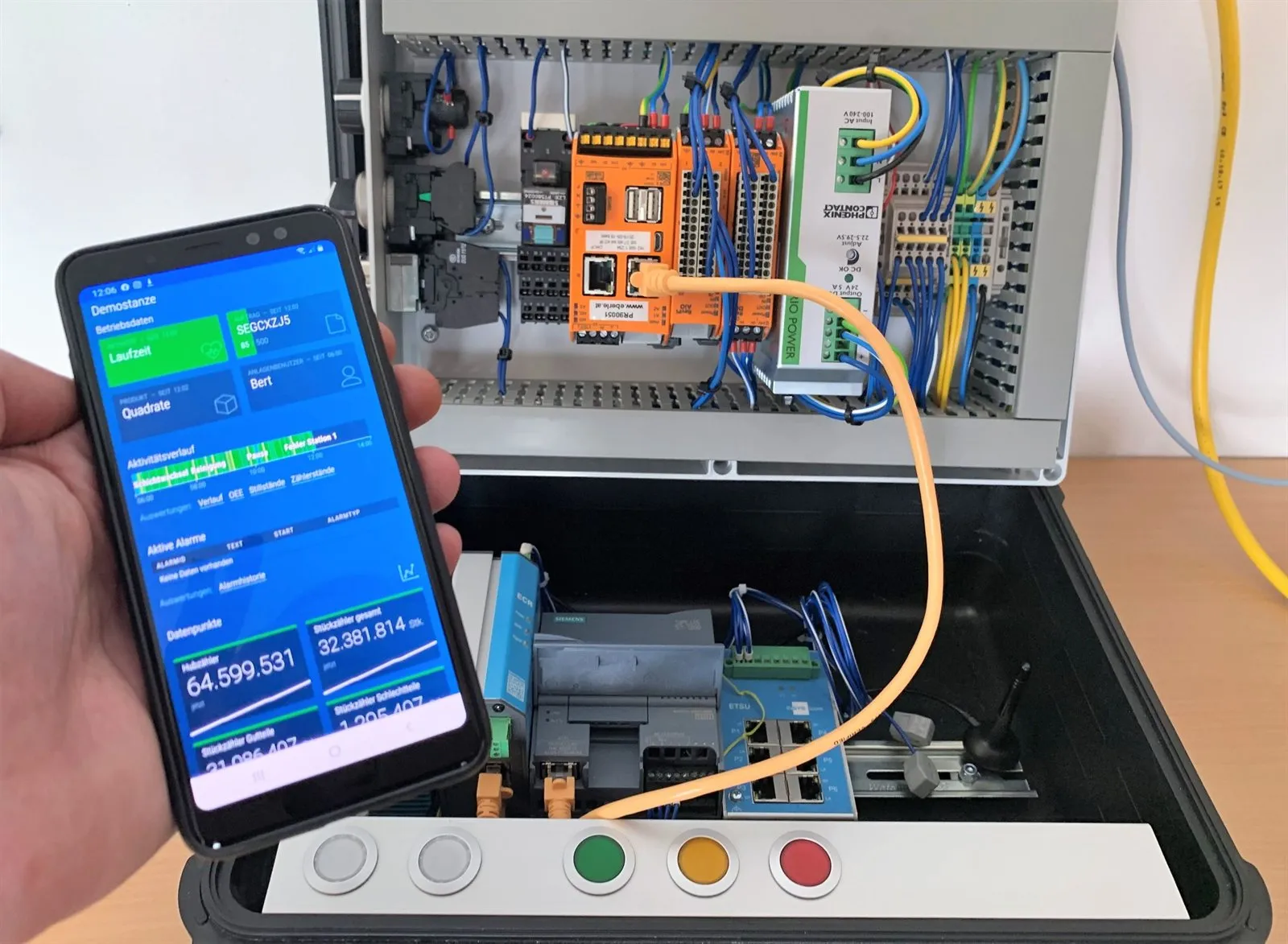
The control IoT gateway offers a wide variety of hardware interfaces and driver software to tap into these data silos.
As an industrial-grade node endpoint, the control IoT gateway sits at the interface between edge systems — networked devices, controllers and sensors — and the IIoT platform control. It ensures a secure data connection and, where required, is supplied with updates remotely.
It is equipped with an internal edge device and versatile interfaces for industrial protocols such as Profibus, Profinet, OPC UA and Modbus TCP/IP, as well as analogue and digital inputs. The latter also allow standalone or retrofitted sensors to be connected directly.
Bringing data sources online in a few steps
The gateway connects to the IIoT platform control via LAN, WLAN or, for mobile use, via LTE. Network cabling at the data source is therefore not strictly necessary.
The hardware is installed directly on site, in the control cabinet of the control system or in an installation box supplied with it. Once installed, the IoT gateway registers itself with the IIoT platform control, so all that remains is to name the data source accordingly and assign it to the plant or organisational unit.
As soon as the control IoT gateway is fully set up, in operation and online, data acquisition from the data source begins. The gateway itself contains integrated procedures, settings and programs that handle protocol conversion, secure data acquisition with local pre-processing, and intermediate buffering.
The control IoT gateway can not only capture data, but also trigger actions remotely via output contacts.
From small to large – start and test with pilot installations
With the control IoT gateway, data sources can be tapped quickly and integrated into the IIoT platform control with ease. Even where no control system exists or additional sensors are required, the gateway provides the necessary input channels. To get started quickly with digitalised operational and process value acquisition, it is advisable to begin with test installations on smaller pilot plants, which makes the rollout for integrating further data sources plannable.
This way, the method of data acquisition and the interfaces are put to the test and provide a reference point for which data values are required to obtain the desired information.
A practical example – it really is this simple!
In the mixing and filling process at a dairy, temperature curves have to be recorded and operating parameters such as the operation of the agitator and the fill level have to be monitored. The process is controlled manually and there is no digital information or interface of any kind.
Solution:
- IoT gateway with power supply and LTE modem
- Temperature sensor
- Level sensor
- Auxiliary contacts for the agitator
After commissioning, the data is recorded continuously and manual acquisition is no longer necessary. If the temperature or the level exceeds a limit value, an alarm message is generated automatically via control.
Machine data acquisition made easy!